> ## Documentation Index
> Fetch the complete documentation index at: https://docs-dev-dr-2812.mintlify.site/llms.txt
> Use this file to discover all available pages before exploring further.

> Describes how to create custom messages and translations with Forms.

# Custom Messages and Translation

You can  customize Form messages to provide your users with a unique Form experience. In addition, you can translate form components, errors, and other custom messages into other languages for a localized experience.

## Messages

Through the Form editor, you can customize error messages and create other custom messages for your users.

### Error messages

You can create custom error messages to replace the default error messages of your forms.

To create custom error messages, follow the steps below:

1. On the Auth0 Dashboard, navigate to **Actions > Forms**.
2. Select **Messages** from the left menu of the Form editor.
3. Select the **Errors** tab\*\*.\*\*
4. Enter your custom error messages in the appropriate fields to replace the default messages.
5. Select **Publish** to save.

### Custom messages

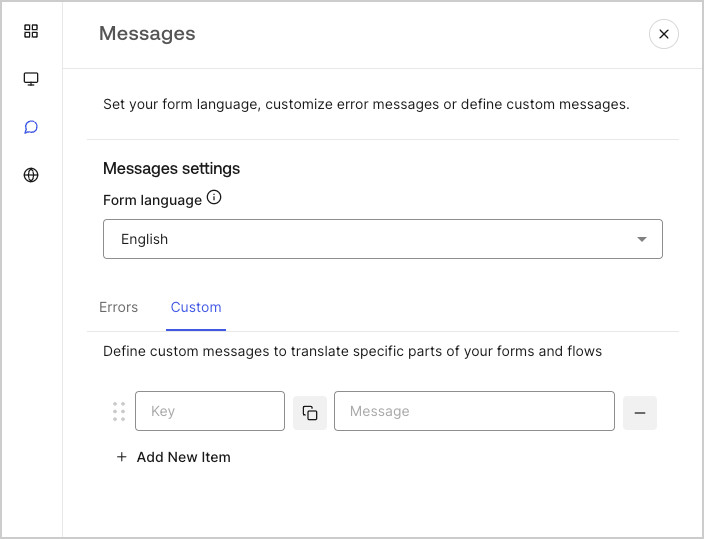
You can create custom messages to add to the default messages for an even further personalized Form experience. For example, you can add a custom message that displays to users when an action returns an error in a flow.

#### Create custom messages

To create custom messages, follow the steps below:

1. From the left menu of the Form editor, select **Messages**.
2. Select the **Custom** tab.Then, select **Add New Item**.
3. To the left, add a unique key for your message\*\*.\*\* Then\*\*, enter\*\* your custom message in the field to the right.
4. Select **Publish** to save.
<Frame>
  <img src="https://mintcdn.com/docs-dev-dr-2812/rOGd7IzKD4o-yaGF/docs/images/cdy7uua7fh8z/1upBOwWqntPPQF8fqGeN6T/a65674d05c823c5fbe703265558693e4/custom-message.png?fit=max&auto=format&n=rOGd7IzKD4o-yaGF&q=85&s=9459044f0df7637da3d1349d0858e2ad" alt="Dashboard > Forms > Custom messages and translations > Custom message" data-og-width="704" width="704" data-og-height="539" height="539" data-path="docs/images/cdy7uua7fh8z/1upBOwWqntPPQF8fqGeN6T/a65674d05c823c5fbe703265558693e4/custom-message.png" data-optimize="true" data-opv="3" srcset="https://mintcdn.com/docs-dev-dr-2812/rOGd7IzKD4o-yaGF/docs/images/cdy7uua7fh8z/1upBOwWqntPPQF8fqGeN6T/a65674d05c823c5fbe703265558693e4/custom-message.png?w=280&fit=max&auto=format&n=rOGd7IzKD4o-yaGF&q=85&s=c09d05bb2a6f95747e36353f9dfacf99 280w, https://mintcdn.com/docs-dev-dr-2812/rOGd7IzKD4o-yaGF/docs/images/cdy7uua7fh8z/1upBOwWqntPPQF8fqGeN6T/a65674d05c823c5fbe703265558693e4/custom-message.png?w=560&fit=max&auto=format&n=rOGd7IzKD4o-yaGF&q=85&s=2e23ae6517495816659c9ed0d7d19f59 560w, https://mintcdn.com/docs-dev-dr-2812/rOGd7IzKD4o-yaGF/docs/images/cdy7uua7fh8z/1upBOwWqntPPQF8fqGeN6T/a65674d05c823c5fbe703265558693e4/custom-message.png?w=840&fit=max&auto=format&n=rOGd7IzKD4o-yaGF&q=85&s=9dad121acf501f4941e33eb2df64ae84 840w, https://mintcdn.com/docs-dev-dr-2812/rOGd7IzKD4o-yaGF/docs/images/cdy7uua7fh8z/1upBOwWqntPPQF8fqGeN6T/a65674d05c823c5fbe703265558693e4/custom-message.png?w=1100&fit=max&auto=format&n=rOGd7IzKD4o-yaGF&q=85&s=f5b480908fdc862ce53955c74d854873 1100w, https://mintcdn.com/docs-dev-dr-2812/rOGd7IzKD4o-yaGF/docs/images/cdy7uua7fh8z/1upBOwWqntPPQF8fqGeN6T/a65674d05c823c5fbe703265558693e4/custom-message.png?w=1650&fit=max&auto=format&n=rOGd7IzKD4o-yaGF&q=85&s=c0eb9e7befcb0f52314452588b432f1b 1650w, https://mintcdn.com/docs-dev-dr-2812/rOGd7IzKD4o-yaGF/docs/images/cdy7uua7fh8z/1upBOwWqntPPQF8fqGeN6T/a65674d05c823c5fbe703265558693e4/custom-message.png?w=2500&fit=max&auto=format&n=rOGd7IzKD4o-yaGF&q=85&s=c170e694734ba823f21c55362d357618 2500w" />
</Frame>

#### Add custom messages to your forms

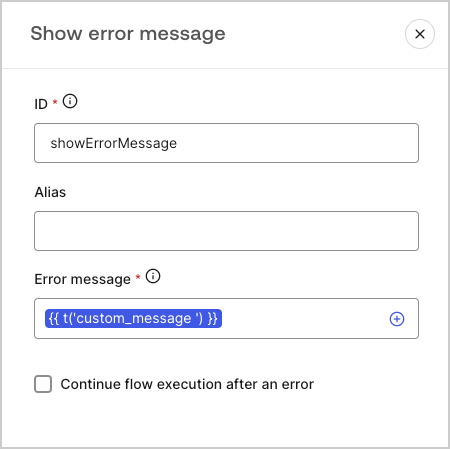
To reference your custom messages in your forms, use the function `{{t('custom_unique_key')}}` with the custom message unique key.
<Frame>
  <img src="https://mintcdn.com/docs-dev-dr-2812/FNJozFxgpP7VXj0p/docs/images/cdy7uua7fh8z/45p4V7w5gw7DQZyJ08ECSH/d040720d9aa19f6e97e21defcd428e55/translation-function.png?fit=max&auto=format&n=FNJozFxgpP7VXj0p&q=85&s=d747ac500cf46fc840ea0dea3815ab03" alt="Dashboard > Forms > Custom messages and translations > Translation function" data-og-width="450" width="450" data-og-height="449" height="449" data-path="docs/images/cdy7uua7fh8z/45p4V7w5gw7DQZyJ08ECSH/d040720d9aa19f6e97e21defcd428e55/translation-function.png" data-optimize="true" data-opv="3" srcset="https://mintcdn.com/docs-dev-dr-2812/FNJozFxgpP7VXj0p/docs/images/cdy7uua7fh8z/45p4V7w5gw7DQZyJ08ECSH/d040720d9aa19f6e97e21defcd428e55/translation-function.png?w=280&fit=max&auto=format&n=FNJozFxgpP7VXj0p&q=85&s=2be0c54ee1e71563f50db1eb3e520275 280w, https://mintcdn.com/docs-dev-dr-2812/FNJozFxgpP7VXj0p/docs/images/cdy7uua7fh8z/45p4V7w5gw7DQZyJ08ECSH/d040720d9aa19f6e97e21defcd428e55/translation-function.png?w=560&fit=max&auto=format&n=FNJozFxgpP7VXj0p&q=85&s=99d310d1a562bc9e27f49851023680d6 560w, https://mintcdn.com/docs-dev-dr-2812/FNJozFxgpP7VXj0p/docs/images/cdy7uua7fh8z/45p4V7w5gw7DQZyJ08ECSH/d040720d9aa19f6e97e21defcd428e55/translation-function.png?w=840&fit=max&auto=format&n=FNJozFxgpP7VXj0p&q=85&s=90aa96479224e7c8b3cfbe799f5650aa 840w, https://mintcdn.com/docs-dev-dr-2812/FNJozFxgpP7VXj0p/docs/images/cdy7uua7fh8z/45p4V7w5gw7DQZyJ08ECSH/d040720d9aa19f6e97e21defcd428e55/translation-function.png?w=1100&fit=max&auto=format&n=FNJozFxgpP7VXj0p&q=85&s=dd7a1168eb0073e35535b1429faa014f 1100w, https://mintcdn.com/docs-dev-dr-2812/FNJozFxgpP7VXj0p/docs/images/cdy7uua7fh8z/45p4V7w5gw7DQZyJ08ECSH/d040720d9aa19f6e97e21defcd428e55/translation-function.png?w=1650&fit=max&auto=format&n=FNJozFxgpP7VXj0p&q=85&s=e580d03741a5f44d59c97653a77dbbb5 1650w, https://mintcdn.com/docs-dev-dr-2812/FNJozFxgpP7VXj0p/docs/images/cdy7uua7fh8z/45p4V7w5gw7DQZyJ08ECSH/d040720d9aa19f6e97e21defcd428e55/translation-function.png?w=2500&fit=max&auto=format&n=FNJozFxgpP7VXj0p&q=85&s=502d54122f11e9b8b5fea36303b09584 2500w" />
</Frame>

## Translations

You can use the Translations feature to create an international user experience of your forms. This feature leverages a user’s browser language to determine the appropriate language for your forms.
By default, translations for some standard error messages are provided in Spanish. However, to promote a quality user experience, you can define the translations for your form components, errors, and custom messages in the language of your choice.

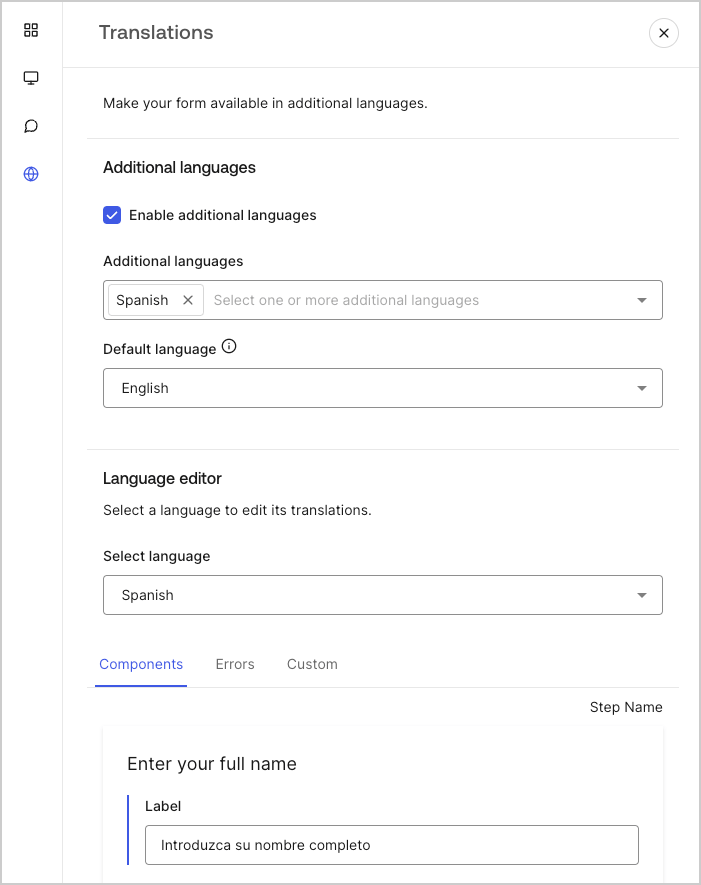
To enable translations, follow the steps below:

1. On the Auth0 Dashboard, navigate to **Actions > Forms**.
2. Select **Translations** from the left menu of the Form editor.
3. Check **Enable additional languages**.
4. Select the desired languages from the **Additional languages** dropdown menu.

### Translate messages

With the language editor, you can define translations for your form components, errors, and other custom messages.

To define your translations, follow the steps below:

1. Select the desired language from theSelect language dropdown menu.
2. Select one of the following tabs to begin defining your translations:

   1. **Components**
   2. **Errors**
   3. **Custom**
3. For each available field, provide your translations as needed.
4. Select **Publish** to save.
<Frame>
  <img src="https://mintcdn.com/docs-dev-dr-2812/e71W31voHBE6PTB5/docs/images/cdy7uua7fh8z/5HY9FA6HZct2XNv5K4pCHY/c5977a7825e15285c3d77c2ca1e299a8/translation-message.png?fit=max&auto=format&n=e71W31voHBE6PTB5&q=85&s=494c86b009d6e56a72039c90d9855b70" alt="Dashboard > Forms > Custom messages and translations > Translation message" data-og-width="701" width="701" data-og-height="885" height="885" data-path="docs/images/cdy7uua7fh8z/5HY9FA6HZct2XNv5K4pCHY/c5977a7825e15285c3d77c2ca1e299a8/translation-message.png" data-optimize="true" data-opv="3" srcset="https://mintcdn.com/docs-dev-dr-2812/e71W31voHBE6PTB5/docs/images/cdy7uua7fh8z/5HY9FA6HZct2XNv5K4pCHY/c5977a7825e15285c3d77c2ca1e299a8/translation-message.png?w=280&fit=max&auto=format&n=e71W31voHBE6PTB5&q=85&s=1e24d313ba63347719bf019fb3d46c63 280w, https://mintcdn.com/docs-dev-dr-2812/e71W31voHBE6PTB5/docs/images/cdy7uua7fh8z/5HY9FA6HZct2XNv5K4pCHY/c5977a7825e15285c3d77c2ca1e299a8/translation-message.png?w=560&fit=max&auto=format&n=e71W31voHBE6PTB5&q=85&s=c66c9eae133fbb91092c06dc9c11b57e 560w, https://mintcdn.com/docs-dev-dr-2812/e71W31voHBE6PTB5/docs/images/cdy7uua7fh8z/5HY9FA6HZct2XNv5K4pCHY/c5977a7825e15285c3d77c2ca1e299a8/translation-message.png?w=840&fit=max&auto=format&n=e71W31voHBE6PTB5&q=85&s=3e3c20cb92661968825716609fd568ba 840w, https://mintcdn.com/docs-dev-dr-2812/e71W31voHBE6PTB5/docs/images/cdy7uua7fh8z/5HY9FA6HZct2XNv5K4pCHY/c5977a7825e15285c3d77c2ca1e299a8/translation-message.png?w=1100&fit=max&auto=format&n=e71W31voHBE6PTB5&q=85&s=f0377fe16eb0bafe14b6a76cd548850b 1100w, https://mintcdn.com/docs-dev-dr-2812/e71W31voHBE6PTB5/docs/images/cdy7uua7fh8z/5HY9FA6HZct2XNv5K4pCHY/c5977a7825e15285c3d77c2ca1e299a8/translation-message.png?w=1650&fit=max&auto=format&n=e71W31voHBE6PTB5&q=85&s=b94838273120016d4f80128412ad489d 1650w, https://mintcdn.com/docs-dev-dr-2812/e71W31voHBE6PTB5/docs/images/cdy7uua7fh8z/5HY9FA6HZct2XNv5K4pCHY/c5977a7825e15285c3d77c2ca1e299a8/translation-message.png?w=2500&fit=max&auto=format&n=e71W31voHBE6PTB5&q=85&s=cc2ff0d1282c0df6ec681843b1658cd4 2500w" />
</Frame>
